 |
|||||

|
Search For Courses: | Send To A Friend | |||
| Our Courses : Creative Courses I Internet Courses I Programming Courses I Hardware Courses I Network certification courses I Courses for Kids l MS Office & Financial Accounting Courses |
| More Info : About Us I Franchise Schemes I Our Centers I Student's Reviews I Student Course Schedules I Student's Project Galleries l Web Promotion |
| Miscellaneous : Your Feedback I Location of Compufield I Site Map I Student's Accomodation I Per Day Expenses I Top Downloads I Club Facilities I Jobs Assistance |
| Student's Registration : Invoice I Letter of Acceptance I Registration Form I Tuition Fees Payment Facilities I Indian Consulates I Which Visa to Apply ? |

Why do Foreign/Indian Students prefer to study at COMPUFIELD?
Diploma in Computer Generated Interior Designing (CAD)
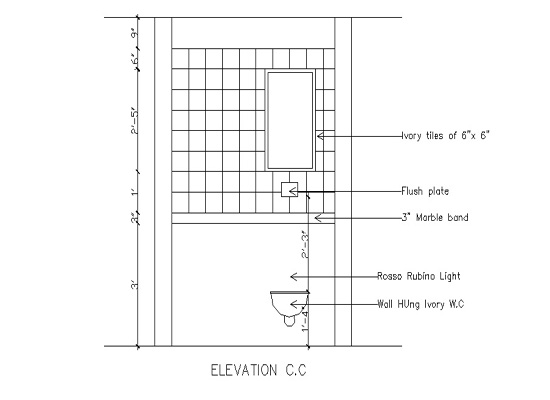
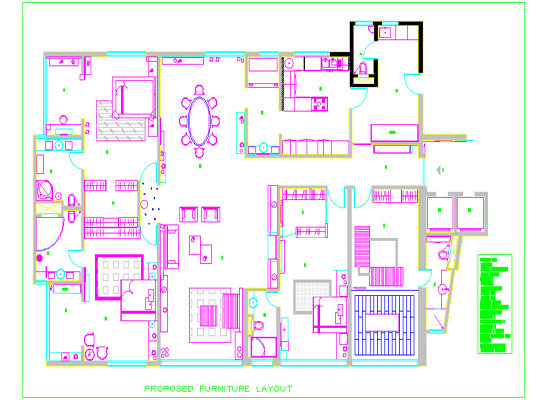
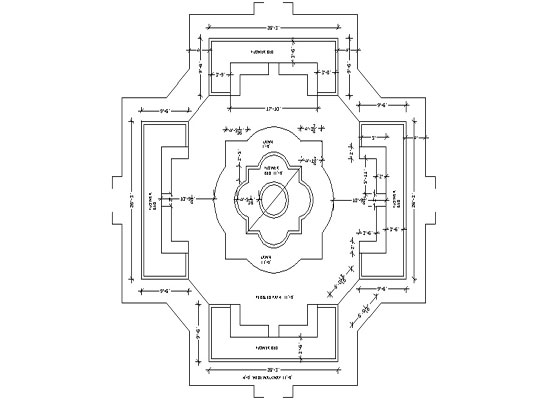
OUR STUDENTS INTERIOR DESIGN PROJECTS
AutoCAD is the most powerful and the most popular AUTOMATIC COMPUTER AIDED Drafting Program. We want to help you unlock AutoCAD's power to do your designing and drafting work, quickly and easily.
Topics Covered in AutoCAD: 1. Getting Started:
Starting & Closing AutoCAD
AutoCAD Interface Overview
Communicating With AutoCAD
Managing Your Drawing Files
2. Display Commands:
View Magnification
ZOOM Window
ZOOM Previous
ZOOM Extents & Zoom Object
ZOOM Scale
ZOOM & PAN In Real Time
3. Coordinates & Basic Drafting Tools:
Orthographic & Polar Coordinates
Object Snap Overrides
Running Object Snaps
POLAR & Direct Distance Entry
SNAP & GRID
Intro to OTRACK4. Creating 2D Geometry:
Creating LINE Objects
Creating CIRCLEs & ARCs
Introduction to LWPOLYLINEs
Creating & Using POINTs
Introduction to ELLIPSEs
Creating Splines
5. Editing 2D Geometry:
Using ERASE to Delete Objects
Basic Selection Tools
MOVE & COPY
SCALE
ROTATE
Grip Editing
6. Managing Object Properties:
Introduction to Layers
Managing Properties BYLAYER
Linetypes & Drawing Scale
Introduction to Lineweights
Object Properties
Overriding BYLAYER Properties
Match Properties
CAD Standards7. CAD Construction Techniques:
OFFSET
TRIM
EXTEND
FILLET
CHAMFER
MIRROR
STRETCH
ARRAY
8. Creating Text & Defining Styles:
Single Line TEXT Objects
Creating & Modifying Text Styles
Introduction to MTEXT Objects
Editing Existing Text
9. Introduction to Blocks:
Making Block Definitions
Inserting Blocks & Drawing Files
Introduction to DesignCenter
10. Dimensions & Crosshatching:
Dimensions For Distance
Angular Dimensions
Radial & Diameter Dimensions
Introduction To Dimension Styles
Using Styles Defined In Other Drawings
Editing Dimensions
Creating New HATCH Objects
Editing Existing HATCH Objects
11. Page Setup & Plotting:
Overview
Creating New Layouts From Scratch
Freezing Layers in Viewports
Plot Styles
12. Introduction to Drawing Setup:
Drawing Setup Overview
Understanding Units in AutoCADSALIENT FEATURES
APPLICATIONS
AutoCAD is a software designed to create drawings related to various fields such as :
- Interior Designing.
- Architectural Engineering.
- Mechanical Engineering.
- Electrical Designing.
3D STUDIO MAX .
3D Studio Max is a tool from Kinetix for making 3D Models, Designs and also to create simple as well as complex 3-Dimensional Animations.
SALIENT FEATURES
- 3D Modelling and Rendering.
- Architectural drawings and layouts of all kinds.
- Interior design and facility planning.
- Line drawings for the fine arts.
- Using 3D-Studio Max, is an important part of communicating with the drawing community.
- Achieve impressive presentations by simply souping up your 2D drawings and presenting them in dynamic views.
- Gain a competitive edge by taking the time to build full 3D drawings.
- A new paradigm for Design Visualization.
- 3D Studio Max is much more than just a form Creation tool.
- 3D Studio Max software gives you the freedom to Experiment and Race ahead with your Ideas and Imaginations.
- Photographic & natural backgrounds made by yourself to create extraordinary environment.
- The Special effects & extra lighting effects to make the environment much more vibrant.
- Integrated Keyframe Animation. Subtle Visual Effects - Visual effects are available like fog, atmospheric effects, volumetric lighting and the effect of fire to help make, your Project Powerful and Natural.
- Powerful Materials Editor, Simple materials with full control of color, textures shininess, strength of shininess, self-illumination and opacity are built-in.
- Rich Lighting Tools, Quick, precise control of lighting effects.
- Nondestructive Booleans and Lofts Merging outer Scenes or Film Clips with the Project made in 3D Studio Max.
- Completely Redesigned Documentation and Tutorials.
- Auto Back Light - Automatically position the sun for any day of the year, any time of day, any position on the earth, or any angle true north relative to your model.
APPLICATIONS
CorelDraw is a Vector Graphics Software, allowing the user to produce World Class Illustrations with 16.7 million colours. THE SPECIAL APPLICATION OF TEXTURES AND GRAPHICS FOR 3D VISUALIZATION allows the user to give a realistic look to their designs.
CorelDRAW The program is looked at both as a "stand-alone" application and also as partnering software for 3d studio max and AutoCAD. |
Click on the image to see an enlarged viewAPPLICATION
Adobe Photoshop is an Image Processing software package that enables you to create & edit images on IBM personal computers. Adobe Photoshop is acknowledged in professional fields as the cutting-edge,the final word in image editing.
For Salient Features & Applications

.





| Duration | Fees (Indian RS.) | Fees (US $) |
|---|---|---|
| 220 Sessions of 1 hr. each | 26,000 | 650 |
* Lodging, boarding and travelling not included in the fees.
*The above mentioned fees is for one course and it includes instructions,
practicals, practice, project, preparation for exam(if any)
COMPUFIELD offers a unique style of learning -
- Fees is for one course and it includes instructions,
practicals, practice, project, preparation for exam(if any)
between 9.00 a.m. to 7.00 p.m.
Seeing
is believing
Click
on the image below to go to Student's Design Gallery

| Gallery
II |
Gallery
III |
Visit Our Student's Design Galleries |
|
Solve
your Queries Online related to our Courses
|
|
|
|
|
|
|
 Fax
Number Fax
Number 091-22-23671772 |
 E-mail me
  Yahoo
Messenger
Yahoo
Messenger MSN Messenger
 Gmail
Gmail Mobile
Number
Mobile
Number HEAD OFFICE : Chinoy Mansion, First Floor, Block # 2,
Opposite St.Stephen's Church, Warden Road, Mumbai (Bombay)-400 036
India.
 : 091-22-23676218
(3 Lines), Fax: 091-22-23671772
: 091-22-23676218
(3 Lines), Fax: 091-22-23671772
